98.3% success · 11 auxiliary requests excluded
OPEN SOURCE · MIT · LOCAL-FIRST
Your AI agent shouldn't be a black box
Pick any modelSee every callKnow the cost
Your AI workflow, in full view
DeepAA / Dashboard
 DeepAADashboardUTC+8
CodexLaunchClaude CodeLaunchOpenCodeLaunchDeepSeek HarnessLaunchZCodeLaunch
bigmodelPlan
Available quota68%5 hours / 1 week
catapiPay-as-you-go
Account balance¥ 9.45Pay-as-you-go
chatgptSubscription
Available quota100%Sync failed
auto-codePay-as-you-go
Account balance$ 1005.33 (≈ ¥62.83)Pay-as-you-go
opencodePlan
Available quota100%5 hours / 1 week / Month
Input, output, and cache usage in one view
Usage charges + estimated plan cost
Usage ¥1.62Plan estimate ¥53.39
Token usage over time
Cache hit rate 95.9%24-hour usage · millions of tokens
Token cost ranking
Estimated cost per million tokens
grok-4.7opencode¥ 8.89/M
gpt-5.6-solchatgpt¥ 0.41/M
gpt-6.1-solauto-code¥ 0.36/M
gpt-6.1-solchatgpt¥ 0.24/M
Usage by dimension
Model
glm-5.3356M
glm-5.3-flash50M
gpt-6.1-sol38M
Provider
bigmodel406M
catapi28M
chatgpt8.03M
Agent
ZCode409M
Codex39M
DeepSeek Harness3.14M
Top three in each dimension · full analytics in your local console
Your AI workflow, in full view
Launch agents, balances, usage, and cost in one console.
Sample snapshot · 2026-10-09 · UTC+8 · Static product sample. Launching, syncing, and configuration happen in your local console.
Explore the full product UI
WORKS WITH THE TOOLS YOU ALREADY USE
CodexClaude CodeOpenCodeDeepSeek HarnessZCode
OpenAI Responses / Chat Completions · Anthropic Messages
Official APIs, compatible relay services, and local models. Connected.
CALL TRACING
Beyond the result. Evidence at every step.
Follow a task from session to step. Connect model requests, tool calls, and responses, then inspect the input, output, and usage that matter.
Explore call tracing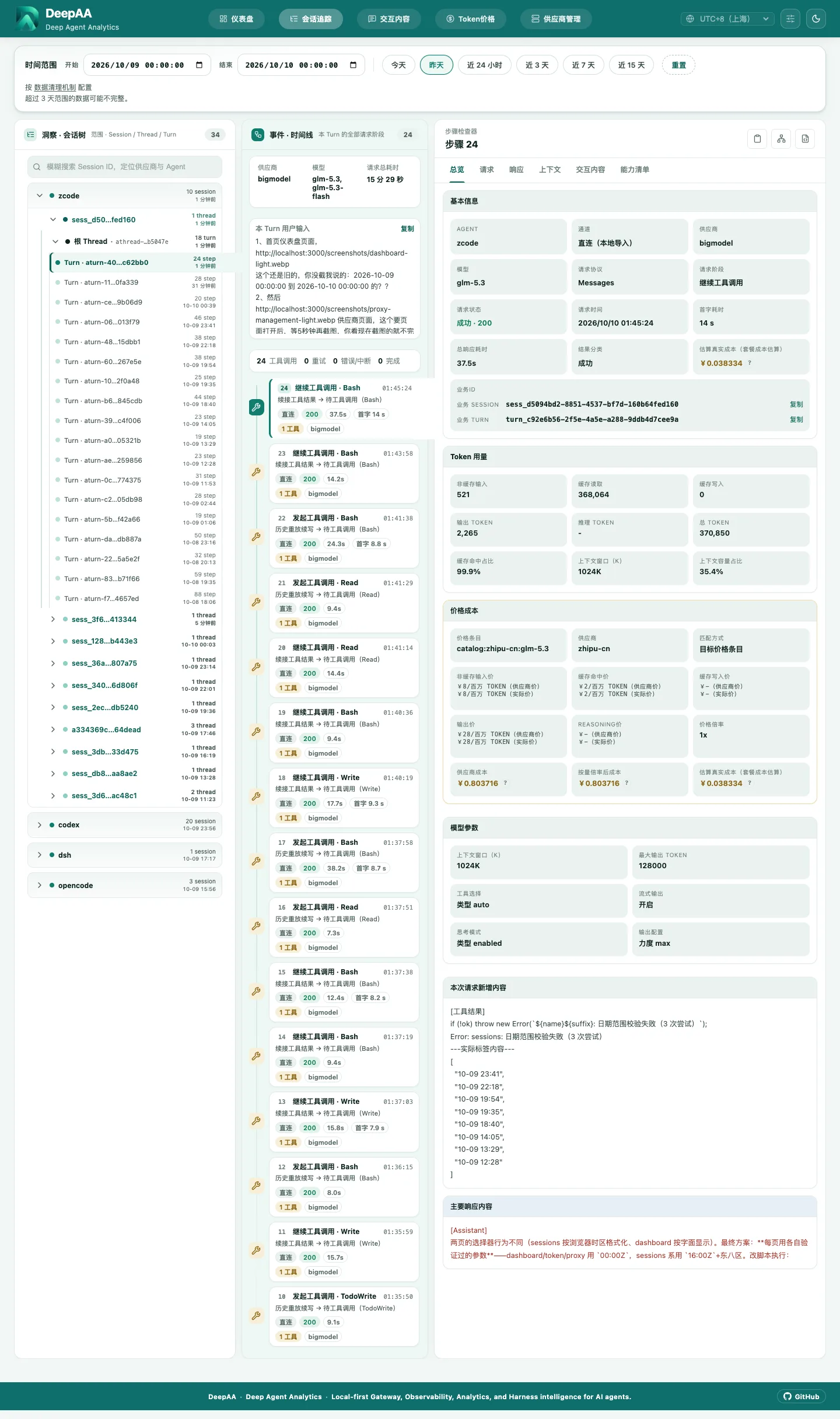
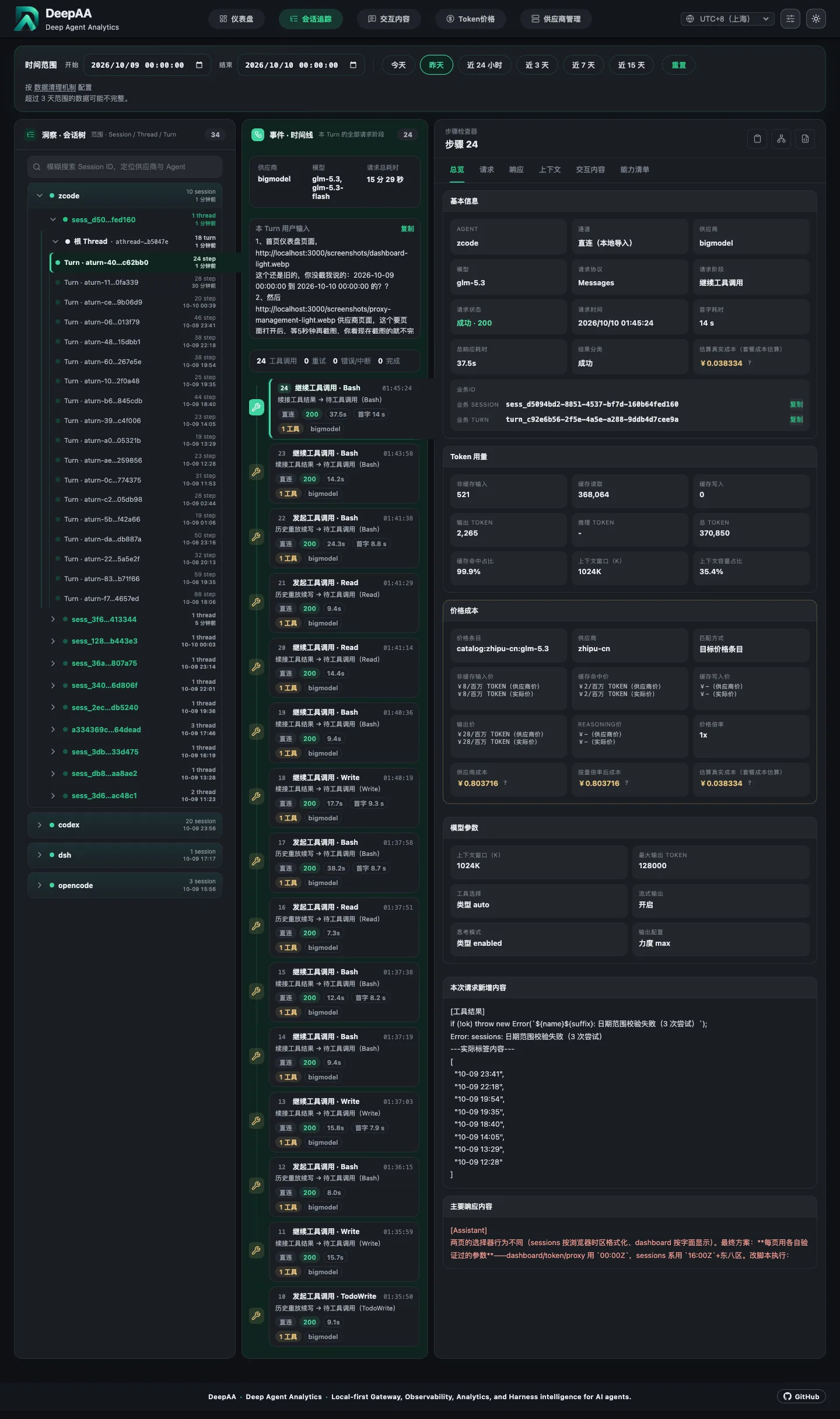
Session → Thread → Turn → Step
01Follow tasks, sub-agents, and steps in one chain
02Inspect prompts, tool arguments, and results on demand
03Connect each step to its tokens, latency, and cost
ONE CONSOLE FOR YOUR AI WORKFLOW
See clearly. Work reliably. Understand cost.
USAGE & COST
Know where every token goes.
Inspect per-request costs and formulas, from token rates, caching, and credential multipliers to plan usage rules. Compare totals by model, provider, and agent.
Understand cost reportingCombined sample cost¥55.01
Usage charges¥1.62
Estimated plan cost¥53.39
Prices, multipliers, and exchange rates are frozen per call for traceable records.
Your models and providers. One place to manage them.
Check provider balances and plan quotas, sync managed agent settings, and use compatible models from multiple providers in the same agent.
CodexClaude CodeOpenCode
DeepAALocal gatewayOfficial / relay / local modelsKeep the details. Find the problem.
Inspect requests, responses, and streaming diagnostics. Copy curl commands and export content within an explicit scope.
Prompt
Explore evidence & exportinputTool Callcall → resultResponseoutputSSEstreamRELIABLE CALLS
When one channel fails, backups take over.
Configure ordered model-and-provider backups, with quick launch and model switching for everyday coding workflows.
Read about failover01
Primary modelModel × provider
02
Backup modelModel × provider
03
Next backupModel × provider
LOCAL-FIRST, BY DESIGN
Your observability data. On your machine.
Captured requests, responses, and analytics stay on your machine, with no upload to a DeepAA cloud. No account required. Open code. Your data.
Read about data & privacyYour machine
Coding agent DeepAA
Local observability & analytics~/.deepaa
Model requests still go to the provider you choose. Observability records are not uploaded to DeepAA.
Local storage
Observability data is stored and analyzed locally
No account
Install and use your local console directly
MIT licensed
Open source, issues, and release history
GET STARTED
Make your next call a little clearer.
Choose an install method. One command opens your local console.
curl -fsSL https://deepaa.dev/install.sh | bashThe script checks or installs Node.js, then starts DeepAA.
Or ask your local agent to install it
One-Prompt Install via Your Local AgentRecommended
Copy the prompt below and paste it into Claude Code, Codex, Cursor, or any local agent — it will install and launch DeepAA for you.
Install and start DeepAA (a local-first AI agent gateway, observability and analytics tool) on this machine:
1. Check the Node.js version — 22.13+ is required; if missing or outdated, install the LTS release first;
2. Run npm install -g deepaa for a global install; on a slow network, add --registry=https://registry.npmmirror.com to this install only; do not change global npm settings;
3. Once installed it auto-launches and opens http://localhost:3210 (proxy on port 3211); if the browser did not open, run deepaa to start it;
4. Verify the Web UI is reachable and report the URL back to me.
How does DeepAA work with my coding agent?
DeepAA is a local gateway and observability console. Keep using Codex, Claude Code, OpenCode, DeepSeek Harness, or ZCode while DeepAA helps connect models and inspect calls, usage, and cost.
Do I need to change agent source code or add an SDK?
No. Configure the local gateway for OpenAI / Anthropic compatible requests. Supported official-direct clients can also import local logs. On first use, explicitly select your agent, provider, model, and credentials in the console.
Where is my data stored?
Observability data is stored in ~/.deepaa on your machine, with no upload to a DeepAA cloud. Local services bind to 127.0.0.1 by default. Model requests still go to your chosen provider. Raw records can contain sensitive information; review them before sharing.
Are plan costs and usage charges reported the same way?
Usage charges use the price, multiplier, and exchange rate recorded at call time, with reconciliation adjustments where supported. Plans and subscriptions report estimated costs; unavailable estimates are marked as pending rather than presented as actual bills.
Which systems and model services are supported?
One-line installation supports macOS and Windows. The gateway accepts OpenAI Responses, Chat Completions, and Anthropic Messages compatible endpoints, including official APIs, compatible relays, and local models. Agent and model capabilities depend on your connection settings.